

A Saudi-based business can reach the final stage of a website localization Saudi Arabia project and still discover that the Arabic experience is not ready for customers.
The content may already be translated. RTL may be enabled. The language switcher may work, and every important page may appear responsive on a desktop screen. Yet those checks alone do not show what happens when someone tries to complete a real task.
An Arabic-speaking customer may begin on a fully localized service page and reach an English-only form. A language change may remove information they have already entered. A checkout that looks fine during desktop review may become difficult to complete on a phone, while validation or payment messages may be much clearer in English than Arabic.
The better launch test is therefore not whether every page has been translated. It is whether Arabic-speaking customers can move through the complete website with the same clarity and confidence expected from the English experience.
Quick Answer: A Saudi business’s Arabic website is launch-ready when Arabic-speaking customers can complete full tasks — not just view translated pages — without hitting untranslated content, losing form progress, or struggling on mobile. This checklist covers RTL testing, mobile UX, form localization, SEO signals, and real user testing before going live.
Arabic Website Launch Checklist: What Saudi Businesses Need to Verify Before Going Live
Start With Complete Arabic Customer Journeys
Before reviewing individual interface details, identify the actions that matter most to customers.
For a professional service company, the journey might begin with finding the right service, understanding what is offered, and submitting an inquiry. An online retailer should test product discovery, cart, checkout, payment, and confirmation. A SaaS company may need to follow registration through onboarding and into the product itself.
Complete these journeys entirely in Arabic.
This immediately exposes problems that are easy to overlook when teams approve translated pages one at a time. A service description may be localized correctly while the inquiry form remains partly English. Navigation terminology may change between sections. A user may complete an action successfully but receive an unclear or untranslated confirmation afterward.
Consistency matters as much as translation accuracy. The same concept should not be described differently across navigation, forms, account areas, and support content unless there is a genuine reason.
Think of the website from the customer’s perspective. They do not experience a collection of approved pages. They experience a sequence of actions that either helps them reach a goal or makes that goal harder.
For launch testing, test tasks, not just pages.
Check Whether RTL Works as an Interaction
Once an important journey works from beginning to end in Arabic, look more closely at how RTL website design behaves as an actual interaction, not just a layout setting.
RTL affects more than paragraph alignment. Navigation menus, breadcrumbs, filters, forms, pagination, progress indicators, dropdowns, tables, carousels, and directional controls may all need additional attention.
Automatic mirroring can solve part of the problem, but it should not be treated as the final QA step.
Saudi websites frequently contain Arabic and left-to-right information on the same screen. The W3C guidance on Arabic web layouts explains how Arabic interfaces can combine right-to-left text with left-to-right elements such as numbers and Latin-script content, making mixed-direction testing particularly important.
A registration form, for example, may combine an Arabic name with an English email address, a Saudi mobile number, and a numeric reference code. An e-commerce page may display Arabic descriptions beside SAR values, model numbers, and English brand names.
These combinations can create reading-order, alignment, and spacing problems that are not obvious when screens are reviewed as static mockups.
Not every element should automatically reverse direction either. Brand marks, maps, familiar media controls, and some icons may need to preserve their established meaning.
Instead of asking whether RTL has been enabled, test whether the complete interaction still feels understandable when someone actually uses it in Arabic.
Test Important Journeys on a Real Phone
The next test should happen away from the desktop.
Saudi customers frequently access digital services through mobile devices, which means a website should not be considered ready simply because its desktop layout passes review. Browser resizing can help during development, but it does not reproduce the experience of typing, uploading documents, navigating menus, or completing a payment on an actual phone.
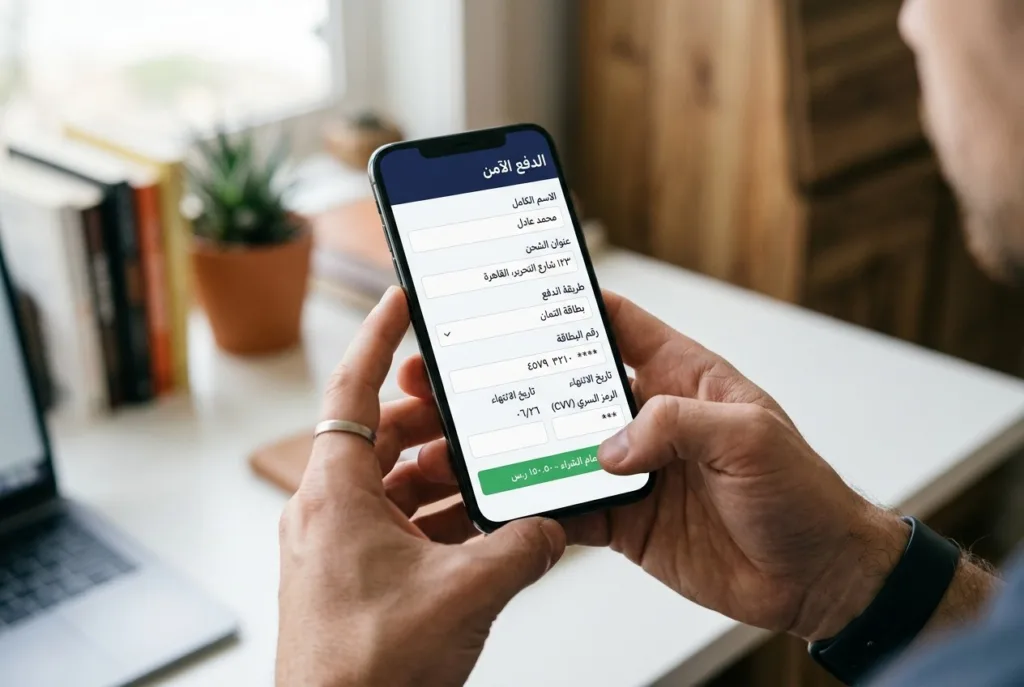
Test the same important Arabic journeys again on mobile.
Look closely at long navigation labels, CTA buttons, forms, language controls, document uploads, login screens, checkout steps, payment interfaces, pop-ups, and confirmation messages.
A form can technically fit within the screen and still be difficult to use. Too many fields may require constant scrolling. Validation may move the user away from the error. A sticky element may cover the button needed to continue. A document-upload process that is simple with a mouse may become awkward from a phone.
This is the difference between a layout being responsive and a task being comfortable to complete.
The issue becomes even more important when a website contains account areas, payments, dashboards, long forms, or several connected stages. For Saudi-based businesses building more complex bilingual experiences, having a senior-led UI/UX design team review the complete journey can help uncover friction that may not appear during a page-by-page review.
Before approving the site, complete its highest-value Arabic tasks on a real phone without relying on development tools to simulate the experience.
Switch Languages Before the Task Is Finished
A bilingual website Saudi Arabia businesses launch should also be tested in a way many internal teams forget: change the language halfway through a task.
Begin filling out an inquiry form in Arabic and switch to English. Add a product to a cart and change languages before checkout. Start a booking, application, or account action and see whether the website preserves what has already happened.
The user should not unexpectedly return to the homepage, lose form information, empty a cart, reset filters, or leave the current account context simply because they changed the interface language.
Language switching can also expose differences between the two versions. The Arabic marketing pages may look complete, while certain account functions, policies, help articles, filters, or transactional screens remain available only in English.
That means the website technically supports Arabic but does not provide an equivalent Arabic experience.
A useful principle is:
Changing the language should not change the task.
The two versions do not need to be visually identical in every detail, but customers should be able to access the same core information and complete the same important actions without starting again.
Put Saudi Forms Through Real-World Testing
Forms deserve separate attention because several localization problems often appear in the same place.
Do not test them only with placeholder content. Enter realistic Saudi customer information.
Check whether name fields accept Arabic and English correctly. Review Saudi mobile-number handling and make sure the expected format is obvious. If physical delivery or service location matters, confirm that address fields make sense for users in Saudi Arabia rather than forcing information into a structure copied from another market.
Dates can also cause unnecessary confusion. If a field expects a Gregorian date, Hijri date, or a particular format, communicate that clearly instead of presenting users with an ambiguous numeric field.
Then test mixed-direction information. Arabic text may sit beside email addresses, account numbers, SAR amounts, reference codes, or English product names. These combinations should remain readable rather than appearing visually disordered.
Validation is just as important as data entry. If the website is being used in Arabic, an error should appear in Arabic, close to the relevant field, and explain what the customer needs to correct.
File uploads should be tested on mobile as well, particularly where customers may need to submit documents during registration, verification, booking, or application processes.
Finally, question the form itself. If information is not genuinely needed to complete the task, removing the field may improve both usability and data handling.
Make Trust and Privacy Information Easy to Find
A customer should not need to search through several pages to understand who operates the website, what happens after a transaction, or how their information is handled.
The exact information required depends on the business, but relevant details may include company contact information, privacy notices, terms, delivery information, return and refund policies, complaint procedures, and customer support options.
Transactional websites should be especially clear about what happens around payment. Customers should understand the amount they are paying, any relevant charges, whether a transaction succeeded or failed, and what action follows.
Privacy deserves the same practical review.
Look at contact forms, account registration, newsletter sign-ups, analytics, tracking scripts, advertising tools, and other mechanisms that collect information. The team should be able to answer three basic questions:
What information are we collecting? Why do we need it? Have we clearly explained its use?
Saudi-based businesses processing personal information should review the PDPL requirements relevant to their activities and obtain appropriate compliance advice where necessary.
E-commerce businesses may also have additional Saudi commercial and authentication requirements depending on their activity. Those requirements should be reviewed before launch rather than addressed only after customers begin using the website.
Make Sure Both Languages Can Be Found in Search
A website can provide an excellent Arabic customer experience and still underperform if search engines cannot correctly understand its language structure.
Review the Arabic and English versions before launch.
Each important page should have an appropriate crawlable URL, localized title, relevant heading structure, and metadata that matches the language of the page. Internal links should lead users and search engines toward the correct language version rather than creating unnecessary mixing.
Multilingual signals such as hreflang and canonical tags also need to be configured carefully. Important pages should be present in the relevant XML sitemap, while accidental noindex directives or crawl restrictions should be removed.
The objective is not to turn the launch process into an advanced SEO project. It is to avoid a common situation where a company invests heavily in Arabic content but gives search engines unclear signals about which version should appear for Arabic queries.
Users should also have an obvious way to switch languages themselves. Automatically choosing a version based only on browser or location assumptions should not prevent someone from reaching the language they prefer.
Check Performance and Accessibility in Arabic Separately
Do not assume that results from the English website automatically apply to Arabic.
Arabic pages may use different fonts, images, scripts, widgets, or language-specific assets. Those differences can affect loading time, interaction speed, and visual stability.
Test important Arabic pages on both desktop and mobile, particularly the pages involved in conversion or customer-service journeys.
Accessibility needs the same separate review.
Check whether Arabic text remains easy to read, headings provide a sensible structure, form labels are clear, keyboard navigation behaves correctly, focus states are visible, and errors can be understood without relying on color alone.
RTL implementation can also affect the way content is interpreted and navigated with assistive technologies.
The objective is not simply to make Arabic content available. Customers should be able to perceive, navigate, and complete the experience regardless of the language they selected.
Let Arabic-Speaking Users Complete Tasks Without Help
The final test should involve people who did not design or build the website.
Internal teams already know where the navigation leads, what terminology means, and what should happen after each action. That familiarity can hide problems from them.
Instead of showing users the website and asking whether they like the design, assign tasks.
Ask someone to find a specific service, submit an inquiry, create an account, complete a booking, upload a document, make a payment, switch languages, recover from an incorrect entry, or locate refund and contact information.
Then avoid helping them.
Watch where they hesitate. Notice when they choose the wrong option, move backward unnecessarily, miss a button, misunderstand terminology, or complete an action but remain unsure whether it succeeded.
These observations usually provide more useful information than general comments about colors or visual style.
If several users encounter the same problem, treat it as evidence about the website rather than a mistake made by the user.
A Simple Launch Decision
By this stage, the business should be able to make a clearer decision about whether the Arabic website is ready.
Consider the launch from four angles:
| Angle | What to Verify |
|---|---|
| Customer Journey | Can Arabic-speaking customers complete key tasks without hitting untranslated content or losing progress? |
| Saudi Context | Do forms, phone numbers, addresses, dates, payments, and data handling fit Saudi customer expectations? |
| Technical Readiness | Are both language versions crawlable, indexed correctly, and reliable across devices? |
| Real Usage | Have real Arabic-speaking users completed tasks independently, with friction points addressed? |
A website does not need to be perfect before it goes live. It should, however, be free from known problems that prevent customers from completing important actions or create a noticeably weaker experience in Arabic.
If those problems are still appearing consistently during testing, another translation review is unlikely to be enough.
Launch the Arabic Experience, Not Just the Arabic Pages
Arabic translation and RTL support are important parts of a Saudi website launch, but they are not the finish line.
The real measure of readiness is whether Arabic-speaking customers can find information, use forms, switch languages, complete transactions, and recover from mistakes with the same confidence expected from the English experience.
For Saudi-based businesses, treating Arabic UX design as part of the product rather than a final localization task usually leads to a more coherent website and fewer problems after launch.
The strongest Arabic websites do not feel like English websites adapted shortly before publication. They feel as though Arabic-speaking customers were considered from the first design decision.
FAQ
What should be on an Arabic website launch checklist?
Complete Arabic customer journeys, RTL interaction testing, mobile testing, mid-task language switching, Saudi-specific form fields, bilingual SEO signals, and independent user testing — not just translation and RTL toggles.
Does a responsive design automatically work for RTL layouts?
No. RTL affects navigation, forms, tables, and mixed-direction content (Arabic text next to English brand names or numbers) in ways that automatic mirroring alone doesn’t solve.
How do I test Saudi-specific form fields properly?
Enter realistic Saudi data — Arabic and English names, Saudi mobile number formats, correct date formats (Gregorian or Hijri as required) — rather than testing only with placeholder text.
What SEO signals matter for a bilingual Arabic/English website?
Correct hreflang and canonical tags, localized URLs and metadata per language, and making sure both versions are present in the XML sitemap without accidental noindex restrictions.
Do I need real user testing before launch, or is internal QA enough?
Internal teams often can’t see friction points because they already know the site’s structure. Independent Arabic-speaking users completing real tasks typically surface problems that internal review misses.
5. Links stay exactly where they are — both the W3C and musemind.agency anchors are already placed naturally in the original text (RTL section and mobile-testing section respectively), no repositioning needed.